

Let me be direct with you: most comparison guides floating around the internet are obsolete. They’re still talking about connecting Gmail to Slack like it’s 2019. But if you’re reading this in 2026, you’re not building simple notification pipelines anymore you’re architecting AI agents that think, decide, and execute complex workflows.
The automation landscape has fundamentally shifted, and the tool that worked perfectly for your basic integrations might quietly drain thousands from your budget when you scale up AI operations. Here’s what nobody tells you upfront: AI workflows demand high data volume processing, intricate reasoning loops, and bulletproof error handling that traditional automation wasn’t built for.
The fundamental difference? Zapier excels at speed and straightforward handoffs between apps. Make.com dominates when you need logic, cost control, and sophisticated AI architecture. Choose wrong, and you’ll either face a shocking $5,000 monthly bill or waste weeks climbing a steep learning curve that delays your launch. Let’s cut through the marketing noise and examine what actually matters.
The Core Philosophy: Linear Pipes vs. Visual Logic
Zapier (The Linear Pipe)
Zapier built its reputation on simplicity: trigger happens, action follows, done. This linear approach works beautifully for straightforward workflows like capturing a new lead, sending it to an AI for qualification, drafting a personalized email, and hitting send.
For founders who need something working by lunch, Zapier delivers that instant gratification. The interface practically holds your hand through setup, and you can deploy a functional automation without touching a single line of code.
But here’s where reality bites: AI is rarely linear. Modern AI agents need to evaluate, branch, retry, and make decisions based on context. They need to think, not just pass data from point A to point B. When you try forcing complex AI logic into Zapier’s “Paths” feature, things get clunky fast and expensive faster. Each conditional branch, each decision point, each retry they all stack up as separate tasks on your bill.
- Zapier Central attempts to bridge this gap with an AI agent layer that sits on top of traditional automation
- Best suited for workflows with 3-5 steps maximum where the path is predictable
- The moment you need your AI to evaluate multiple conditions simultaneously, you’re fighting against the platform’s DNA
Make.com (The Visual Logic Engine)
Make approaches automation like you’re building a flowchart for a reasoning engine. Imagine your AI needs to analyze incoming customer emails, determine sentiment, draft appropriate responses based on emotional tone, loop through a database of 50 previous interactions for context, and update multiple systems accordingly. In Make, you literally see this entire decision tree on one visual canvas. This “god mode” view becomes absolutely critical when you’re debugging why your AI prompt returned gibberish at 2 AM.
The platform treats complex branching as a native feature, not an afterthought. Your automation can split, merge, loop, and aggregate without creating the task explosion that kills Zapier budgets. You can build sophisticated routing logic where the AI analyzes content and sends it down completely different processing paths based on nuanced criteria.
- Perfect for “reasoning engines” where AI makes multiple sequential decisions
- Visual canvas lets you debug complex prompt chains by seeing exactly where data flows
- Native support for scenarios where AI needs to “think” through iterations before acting
- The learning curve is real, but it pays dividends when handling thousands of operations
The “Hidden” Costs of AI Automation (The Financial Trap)
The Pricing Model Battle
This is where dreams of cheap automation go to die. Zapier charges per task and here’s the trap nobody warns you about: every single step in your workflow counts as a task. When you’re just connecting two apps, that’s fine.
When you’re building an AI agent that needs to think, check conditions, loop through data, and retry on failures, you can easily burn through 50 tasks in what feels like a single operation. A seemingly simple AI customer support agent processing inquiries can cost you hundreds of dollars monthly before you even realize it’s happening.
Make.com charges per operation, which sounds similar until you understand the crucial difference: operations are generally cheaper per unit than Zapier tasks. A workflow that costs $0.10 on Zapier might run for $0.02 on Make. But and this is critical Make has its own trap: polling. If you configure Make to constantly “check” for new data instead of using webhooks, it’ll charge you for every empty check. Poorly configured Make scenarios can drain your operations limit while accomplishing absolutely nothing.
- Zapier essentially charges an “AI tax” on complexity the more your agent needs to think, the more you pay
- High-volume AI operations on Zapier become mathematically unsustainable for bootstrapped startups
- Make rewards technical knowledge: configure webhooks properly and your costs plummet
- The rookie mistake: leaving Make on polling mode and wondering why your bill is high despite low actual work
Comparison Table: Cost of 1,000 AI Executions
Let’s get concrete. Imagine processing 1,000 customer support tickets with GPT-4, where each ticket requires: (1) AI analysis, (2) sentiment check, (3) database lookup, (4) response generation, (5) quality check, (6) database update.
Zapier estimate: That’s 6 tasks per ticket × 1,000 tickets = 6,000 tasks. On most Zapier plans, you’re looking at $150-300 monthly just for this single workflow, assuming you’re on a plan that includes enough tasks.
Make estimate: Same workflow configured with webhooks (not polling) might consume 6,000 operations, costing roughly $30-60 monthly depending on your plan. The difference? You could run the same AI agent on Make for a quarter of Zapier’s cost—or scale 4x further on the same budget.
Critical AI Features: Memory, Context, and Loops
Memory: Zapier Tables vs. Make Data Stores
Your AI agent is only as smart as its memory. When a customer asks, “What did we discuss last week?” your automation needs somewhere to store and retrieve context. Zapier Tables surprised everyone by being genuinely useful it’s essentially a built-in database that gives your AI short-term memory without forcing you to learn Airtable or Supabase. For non-technical founders, this is gold.
You can give your AI agent a place to remember conversations, store user preferences, and build basic RAG (Retrieval Augmented Generation) functionality without leaving the Zapier ecosystem.
Make Data Stores exist and function, but they feel rigid and limited. Most experienced Make users skip them entirely and connect directly to Airtable, Supabase, or Google Sheets for AI memory. This adds complexity but gives you significantly more power and flexibility for managing the contextual data your AI needs.
- Zapier Tables integrate seamlessly and require zero database knowledge
- Make Data Stores work but often feel like the weakest link in otherwise powerful automations
- For serious AI memory needs, both platforms benefit from external database connections
- The trade-off: simplicity versus control choose based on your technical comfort level
Handling “The Loop” (Iterators & Aggregators)
Here’s where Make absolutely dominates. Picture this: you upload a 50-page customer feedback PDF and want your AI to generate individual summaries for each of the 10 sections, then combine them into one executive summary.
Make handles this natively with “Iterators” that split your data, process each chunk through your AI model, then use “Aggregators” to combine everything back together. It’s elegant, visual, and doesn’t create billing chaos.
Zapier’s approach to looping has improved, but it still feels like forcing a square peg into a round hole. The platform wasn’t architecturally designed for iterative processing, so workarounds exist but they’re clunky. Worse, each iteration typically counts as additional tasks, creating what I call “task explosion” where a simple loop suddenly generates hundreds of billable tasks.
- Make treats looping as a first-class citizen with dedicated modules
- Processing lists of data (100 leads, 50 emails, 20 documents) is Make’s sweet spot
- Zapier can loop, but you’ll pay dearly for it at scale
- For batch AI processing, Make isn’t just better it’s the only financially viable option
Reliability: When the AI Hallucinates or Fails
Error Handling is Non-Negotiable
Let’s talk about reality: OpenAI‘s API will timeout. It will return malformed JSON. Your carefully crafted prompt will occasionally produce complete nonsense. Claude might hit rate limits. This isn’t pessimism it’s Tuesday. The difference between a professional AI automation and a frustrating experiment lies entirely in how you handle these inevitable failures.
Make.com offers professional-grade error handling that lets you specify exactly what happens when things break. You can configure it to wait five minutes and retry, ignore specific error types while flagging others, or send you an alert only after three consecutive failures. This granular control means your AI agent can gracefully handle temporary API issues without waking you up at 3 AM or losing critical data.
Zapier provides “Replay” features that let you rerun failed tasks, which works for simple cases. But when you need nuanced error handling—like distinguishing between a timeout (retry) versus bad input data (skip and log) Zapier falls short. The platform’s error handling tools exist but feel basic compared to Make’s sophisticated options.
The Verdict: Which One Should You Build On?
Choose Zapier If…
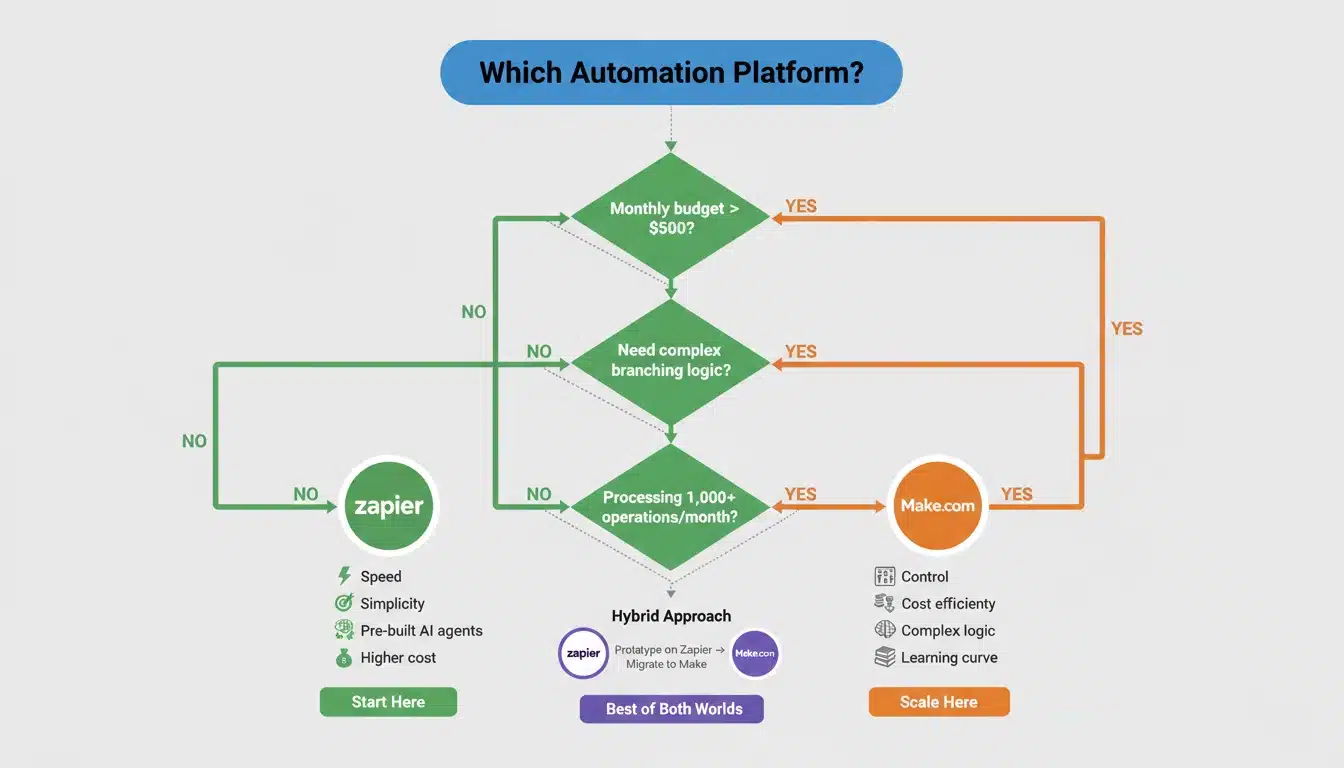
You value time over money and need something running today, not next week. Your AI workflow follows a predictable A-to-B-to-C pattern without complex branching logic. You’re excited about Zapier Central’s built-in AI agents and want the platform to handle the heavy lifting while you focus on business logic. The sight of API documentation or webhook configuration genuinely intimidates you, and you’d rather pay a premium for simplicity. Your monthly automation volume stays under a few hundred executions, keeping costs reasonable.
Choose Make.com If…
You’re building a product or systematic operation, not just a helpful task automator. Your execution volume exceeds 1,000 operations monthly and you’ve done the math on long-term costs. Your AI needs complex decision trees with multiple conditional branches and loops. You’re comfortable learning technical concepts if it means cutting your burn rate while scaling. You can already see yourself needing iterators, aggregators, and sophisticated error handling as your AI agent matures.
Conclusion & Call to Action
Here’s my advice after helping dozens of companies navigate this decision: don’t marry the tool marry your use case. Most successful AI automation journeys start with Zapier for rapid prototyping and validation, then migrate to Make when the monthly bill crosses $500 or the logic gets too complex for linear paths. There’s no shame in using both: Zapier for simple triggers and Make for the heavy AI processing.
The worst decision is paralysis. Pick the tool that matches your current constraints, build something that works, and remain willing to evolve your stack as you scale. Download our AI Automation Pricing Calculator to model your specific use case and see which platform saves you money before you commit to building.
Make.com vs Zapier Pricing Comparison 2026
What actually costs money?
| Platform | You pay for | Why it matters |
|---|---|---|
| Zapier | Tasks (every single step) | Complex AI flows multiply costs fast |
| Make.com | Operations (bundled actions) | One logical action often stays one cost unit |
Typical monthly usage reality
| Usage style | Zapier outcome | Make.com outcome |
|---|---|---|
| Simple alerts and notifications | Cheap | Cheap |
| AI lead qualification | Medium cost | Lower cost |
| AI agents with decisions and retries | Expensive | Stable pricing |
| Large batch processing | Very expensive | Predictable budget |
Quick takeaway
- Small business or low volume → Zapier feels fine
- Growing automation with AI → Make stays affordable
- More conditions = Zapier bill rises faster
Make.com vs Zapier vs Zerowork
How they think differently
| Tool | Main strength | Best user |
|---|---|---|
| Zapier | Fast setup | Non technical founders |
| Make.com | Logic and scale | Builders and operators |
| Zerowork | Prebuilt automations | Agencies and outreach users |
Real use differences
Zapier
- Connect apps quickly
- Good for notifications and CRM sync
- Limited logic control
Make.com
- Build decision trees
- Loop through data
- Control AI behavior
Zerowork
- Ready made growth workflows
- LinkedIn and lead automation focus
- Less customization freedom
When to pick each
- Want something running today → Zapier
- Building a long term system → Make.com
- Doing outreach campaigns → Zerowork
Product Automation Using Zapier and Make.com
Where Zapier helps most
- Send new signup to welcome email
- Notify team in Slack
- Add lead into CRM
- Trigger simple AI reply
Where Make.com shines
- Score leads using AI
- Route customers by behavior
- Process large datasets
- Combine multiple AI decisions
Best hybrid setup (what many teams do)
| Step | Tool |
|---|---|
| Capture form | Zapier |
| Heavy processing | Make.com |
| Final notification | Zapier |
This keeps setup easy while controlling cost.
Zapier vs Make.com Comparison 2026
Speed of building
- Zapier → fastest start
- Make.com → slower but clearer later
Handling complexity
- Zapier → good for straight paths
- Make.com → handles branching logic naturally
Scaling
- Zapier → easier early stage
- Make.com → safer long term
Reliability mindset
- Zapier → retry manually
- Make.com → design automatic recovery
Simple decision guide
| If you need | Choose |
|---|---|
| Quick automation | Zapier |
| AI workflows | Make.com |
| Large operations | Make.com |
| Non technical use | Zapier |
These sections directly answer common decision questions without overwhelming detail while staying practical for real users


