

Today’s dental patients expect instant responses, convenient scheduling, and seamless communication, just like they get from every other service in their lives. Meanwhile, dental practices are drowning in administrative work. Front desk staff spend hours answering calls, managing schedules, sending reminders, and handling patient inquiries. The good news? AI-powered automation is transforming how dental offices operate, making it possible to deliver better patient experiences while reducing workload and costs.
What Is Dental Front Desk Automation?
Dental front desk automation uses technology to handle the repetitive tasks that typically fall on your reception staff. Think of it as having a tireless assistant that can answer phones, schedule appointments, send reminders, and communicate with patients without taking lunch breaks or sick days. At its core, this technology combines artificial intelligence, voice recognition, and workflow automation to manage patient interactions. Instead of a human manually answering every call or typing every appointment reminder, the system does it automatically.
- Simple definition: Automation software that handles phone calls, scheduling, reminders, and patient communication without human staff involvement
- Traditional workflow: Patient calls → receptionist answers → manually checks calendar → books appointment → writes it down → hangs up → calls next patient
- Automated workflow: Patient calls → AI answers instantly → checks availability in real-time → books appointment directly → automatically sends confirmation → moves to next task
- Technology behind it: Natural language processing, integration with practice management software, smart automation rules, and voice assistants
- Key difference: Your staff stops doing repetitive tasks and focuses on what requires human touch helping anxious patients or handling complex treatment questions
Why Dental Clinics Are Shifting Toward Automated Front Desk Solutions
The shift to automation isn’t just about keeping up with technology trends. Dental practices face real operational challenges that automation directly solves. Patients want instant access to care, staffing has become incredibly expensive, and every missed call represents lost revenue. Let’s break down why this shift is happening now.
- 24/7 patient demand: 67% of patients won’t leave voicemail if offices don’t answer, they call the next clinic on their list immediately
- High staffing costs: Average dental receptionist salary ranges from $35,000-$50,000 annually, plus benefits, training costs, and paid time off
- Missed calls equal lost revenue: Missing just 3 calls daily means 15-20 lost appointments weekly that’s $30,000-$50,000 in annual lost revenue
- Growing administrative workload: Front desk handles scheduling, insurance verification, reminders, check-in, payments, and answering questions more patients means more work
- Competitive pressure: Practices that answer instantly and offer convenient scheduling are capturing patients from slower-responding competitors
Key Benefits of Dentists Front Desk Automation
24/7 Answering & Zero Missed Calls
Your automated system never sleeps, never takes breaks, and never misses a call. Whether someone calls at 6 AM on a Sunday or 10 PM on a Friday, they get an immediate response. This means you capture emergency appointments, accommodate patients who can only call outside business hours, and never lose revenue to missed calls again.
- Always available: System handles calls, texts, and messages 24 hours a day, 7 days a week including holidays
- No busy signals: Can handle multiple calls simultaneously, so busy times don’t send patients to voicemail
- Capture emergencies: Weekend and after-hours dental emergencies get immediate response and scheduling
- Revenue protection: Never lose appointments because someone called when your office was closed or staff was busy
- Better first impression: Patients appreciate immediate response instead of waiting on hold or leaving messages
Automated Scheduling & Appointment Management
Patients can book, reschedule, or cancel appointments without waiting for business hours or speaking to a person. The AI checks your real-time availability, offers appropriate time slots, and books the appointment directly into your practice management system.
- Instant booking: Patients schedule appointments immediately without waiting for callbacks or business hours
- Real-time availability: System checks your actual schedule and offers only legitimately available time slots
- Easy rescheduling: Patients can change appointments themselves without phone tag system finds new times and updates everything
- Automatic confirmations: Every booking triggers immediate confirmation messages via text, email, or voice
- Reduced scheduling errors: Direct integration with your PMS eliminates double-bookings and manual entry mistakes
Reduced Administrative Burden on Staff
When your front desk team isn’t answering the same questions 40 times a day, they have time for tasks that actually require human judgment and relationship-building. Staff report feeling less stressed and more satisfied when they’re not constantly interrupted by ringing phones.
- Eliminates repetitive tasks: Staff no longer answer “What are your hours?” or “Do you take my insurance?” dozens of times daily
- Fewer interruptions: Front desk can focus on patients physically in the office without constant phone disruptions
- Time for complex work: Staff can properly process insurance claims, handle billing issues, and address situations needing human judgment
- Improved job satisfaction: Employees feel less overwhelmed and more valued when doing meaningful work instead of repetitive tasks
- Better patient interactions: Staff give full attention to patients at the desk rather than being distracted by ringing phones
Faster Patient Response Times
Nobody likes waiting on hold. Automated systems respond instantly, whether through voice, text, or chat. Patients get answers to their questions within seconds, not minutes or hours.
- Instant response: Patients connect with AI immediately no hold music, no waiting in queue
- Quick answers: Simple questions about hours, insurance, location get answered in seconds
- Efficient for everyone: Patients appreciate fast service; staff appreciate not fielding basic questions
- Better conversion rates: Speed increases likelihood patients choose your practice over competitors they’d need to call
- Reduced frustration: Nobody feels their time is being wasted waiting for basic information
Higher Patient Satisfaction & Retention
When patients can reach your office whenever they need to, book appointments conveniently, and receive timely reminders and follow-ups, they’re happier with your practice. Satisfied patients keep coming back and refer their friends and family.
- Convenience drives loyalty: Patients love being able to schedule, reschedule, or get information on their own timeline
- Consistent communication: Automated reminders at multiple intervals keep patients informed and reduce anxiety about forgetting appointments
- Reduced no-shows: Text and voice reminders at 3 days, 1 day, and morning-of reduce no-show rates from 15% to 6% or less
- Professional impression: Reliable, prompt communication makes your practice feel modern and well-organized
- More referrals: Happy patients recommend practices that are easy to work with and responsive to their needs
Cost Savings Compared to Hiring Staff
An AI receptionist costs a fraction of a human employee’s salary. While a full-time receptionist might cost $40,000-$50,000 annually (plus benefits, taxes, and training), automation software typically runs between $200-$800 per month depending on features and call volume.
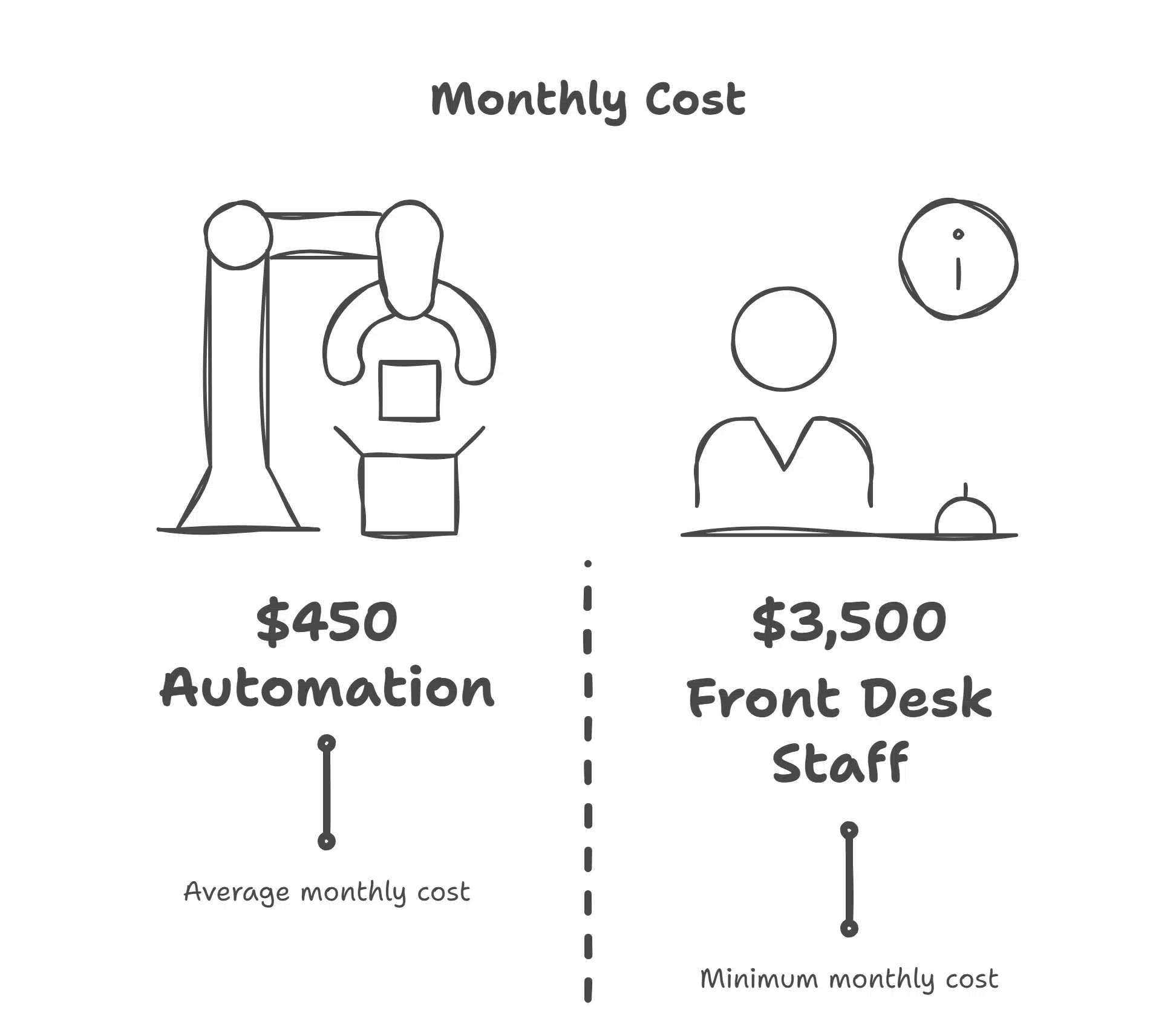
- Massive salary savings: Automation at $450/month costs $5,400 annually versus $45,000+ for full-time staff
- No benefits expenses: No health insurance, payroll taxes, retirement contributions, or paid time off costs
- No overtime or coverage: System works 24/7 at the same flat rate with no extra charges for holidays or weekends
- Quick ROI: Most practices see return on investment within 30-60 days from combination of cost savings and captured revenue
- Predictable expenses: Automation costs stay stable while staff salaries and benefits increase 3-5% annually
Seamless After-Hours & Weekend Support
Many dental emergencies happen outside normal business hours. A broken tooth on Saturday night, sudden pain on Sunday morning, or anxiety about an upcoming Monday appointment patients need to reach you when these situations arise.
- Emergency coverage: Dental emergencies don’t wait for Monday morning automation provides immediate response anytime
- Weekend scheduling: Patients who work weekdays can book appointments when convenient for them, not just during your office hours
- Anxiety management: Nervous patients can ask questions or get reassurance even at 11 PM before their morning appointment
- Competitive advantage: Most dental offices are unreachable after 5 PM being available 24/7 makes you stand out
- Revenue capture: After-hours calls represent 15-25% of total call volume without automation, that revenue is lost
Essential Features to Look for in a Dent Front Desk Automation System
Not all automation solutions are created equal. Here’s what separates excellent systems from basic ones. The features you choose determine whether automation genuinely improves your operations or just creates new frustrations. Focus on systems built specifically for dental practices, not generic business automation tools.
AI Voice Receptionist Capabilities
The best systems don’t just play recorded messages they engage in natural conversations. Look for AI that can understand different accents, handle interruptions, follow complex conversations, and respond appropriately to patient questions. Quality voice AI should sound natural and professional, not robotic or obviously automated.
- Natural conversation flow: AI understands context, handles interruptions, and responds to follow-up questions like a real person
- Accent and speech recognition: Quality systems understand various accents, speech patterns, and verbal quirks without confusion
- Appropriate escalation: AI knows when situations are too complex and transfers to human staff seamlessly
- Professional voice quality: Voice sounds warm and human, not robotic patients shouldn’t feel they’re talking to a machine
- Handles common scenarios: Can answer office hours, insurance questions, location, and parking information accurately
Two-Way Patient Communication (Voice, SMS, WhatsApp)
Patients have communication preferences. Some prefer phone calls, others want text messages, and many use WhatsApp or other messaging apps. Your automation system should meet patients where they are, offering multiple communication channels.
- Multi-channel support: Patients can interact via phone calls, SMS, email, WhatsApp, or web chat based on their preference
- True two-way dialogue: Patients can reply to messages and get responses, not just receive one-way broadcasts
- Conversation continuity: System remembers context across messages patients don’t repeat information in each interaction
- Channel switching: Patients can start conversation via text and continue by phone if needed
- Unified history: All communication channels log to one place so staff see complete patient interaction history
Integrations With Dental PMS (Dentrix, Open Dental, Eaglesoft)
Your automation tool must integrate seamlessly with your existing practice management software. If the systems don’t talk to each other, you’ll end up with duplicate data entry, scheduling conflicts, and frustrated staff. Look for native integrations or robust API connections.
- Real-time two-way sync: Appointments booked by AI appear instantly in PMS; changes in PMS update AI availability immediately
- No double-booking: Integration prevents scheduling conflicts by checking actual availability before booking
- Patient data access: AI can pull patient history, appointment history, and preferences from your PMS
- Eliminates duplicate entry: No manual copying of information between systems everything syncs automatically
- Verified compatibility: Confirm the platform works with your specific PMS version, not just the software name
HIPAA Compliance & Secure Data Handling
Patient health information is protected by law. Any system you use must be fully HIPAA compliant, with proper encryption, secure data storage, signed Business Associate Agreements (BAAs), and robust security protocols. Don’t assume compliance, ask directly.
- End-to-end encryption: All patient communications and data transmissions are encrypted in transit and at rest
- Signed BAA required: Vendor must provide a Business Associate Agreement taking legal responsibility for HIPAA compliance
- Access controls: System limits who can view patient information and logs all data access
- Regular security audits: Vendor conducts penetration testing and third-party security audits regularly
- Data deletion policies: Clear procedures for removing patient data upon request or when no longer needed
Workflow Automation (Reminders, Follow-ups, Intake Forms)
Beyond just answering phones, look for systems that automate your entire patient communication workflow. This includes appointment reminders at multiple intervals, follow-up messages after procedures, birthday greetings, recare reminders for cleaning due dates, and digital intake forms.
- Multi-step reminder sequences: Automated confirmations sent at booking, 3 days before, 1 day before, and morning of appointment
- Post-appointment follow-ups: Automatic messages checking on patients after procedures with care instructions
- Recare campaigns: System tracks last cleaning date and automatically reaches out when patient is due
- Digital intake forms: Patients complete paperwork online before arriving, saving time at check-in
- Customizable workflows: You control timing, content, and triggers for all automated communications
Top Front Desk Automation Solutions (2026 Comparison)
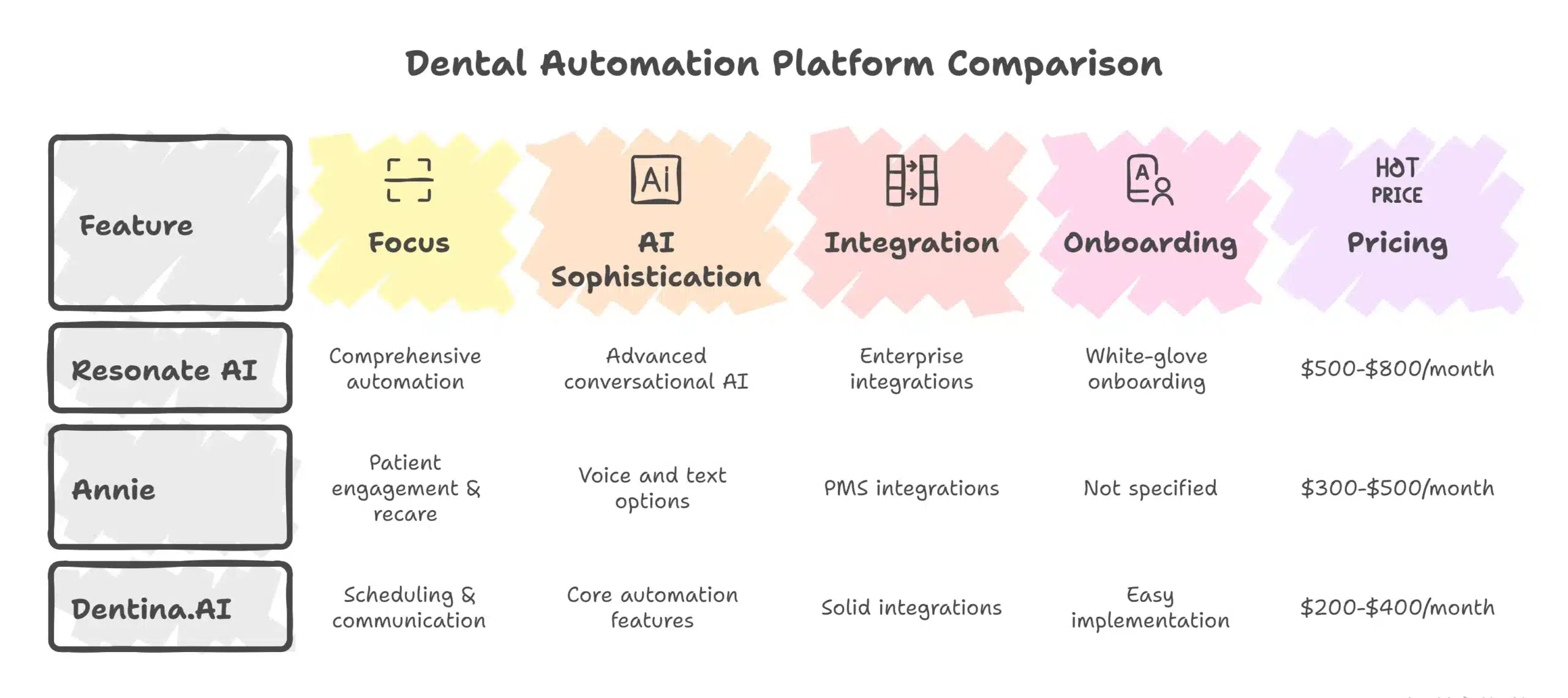
Several platforms now specialize in dentists front desk automation. Here’s an honest look at the leading options. Each platform has different strengths depending on your practice size, budget, and specific needs. Most offer free demos or trial periods, so you can test functionality before committing.
1. Resonate AI – Enterprise-Grade AI Front Desk
Resonate positions itself as the premium solution for dental practices that want comprehensive automation. Their AI voice receptionist handles complex conversations naturally, books appointments across multiple providers and locations, and integrates with major practice management systems. What sets Resonate apart is the sophistication of their natural language processing.
- Advanced conversational AI: Handles complex requests like “I need to bring my two kids in for cleanings on the same day after school”
- Multi-location support: Manages scheduling across multiple offices with centralized analytics dashboard
- Enterprise integrations: Works with Dentrix, Open Dental, Eaglesoft, and most major dental software platforms
- White-glove onboarding: Dedicated implementation team and ongoing account management
- Pricing: $500-$800/month depending on call volume and features, best for multi-location practices and DSOs
2. Annie – Automated Patient Communication & Recare
Annie focuses heavily on patient engagement and recare management. While they offer appointment scheduling, their strength lies in automated reminder systems, recare campaigns, and patient retention workflows. The platform excels at keeping patients coming back with automated birthday messages and personalized outreach.
- Recare excellence: Automatically tracks due dates and sends personalized reminders to patients overdue for cleanings
- Engagement campaigns: Automated birthday messages, treatment plan follow-ups, and check-in sequences
- Voice and text options: Patients can respond via phone or text based on their preference
- PMS integrations: Works with most major dental software including Dentrix, Eaglesoft, and Open Dental
- Pricing: $300-$500/month ideal for practices focused on patient retention and consistent recare outreach
3. Dentina.AI – Scheduling & Communication Assistant
Dentina offers a straightforward, user-friendly approach to dental automation. Their platform focuses on core functions answering calls, booking appointments, sending reminders, and basic patient communication. What makes Dentina attractive is the simplicity of setup and use.
- Easy implementation: Simple setup process with minimal technical knowledge required
- Core automation features: Handles essential tasks without overwhelming complexity or unused features
- Intuitive interface: Staff find the system easy to learn and use daily
- Solid integrations: Works with popular dental software including Dentrix and Open Dental
- Pricing: $200-$400/month perfect for solo practitioners and small practices wanting essential automation without premium cost
Real-World Impact: Before vs After Dental Automation
Before Automation: Missed Calls, Slow Intake, High Workload
Dr. Martinez runs a family dental practice in Phoenix. Before automation, her two front desk staff spent their entire day answering phones, managing schedules, and calling patients for reminders. They averaged 8-12 missed calls daily mostly during peak times when both staff members were helping patients at the desk.
- Constant missed calls: 8-12 calls went to voicemail daily during lunch, peak times, or when staff helped in-office patients
- Slow new patient intake: Phone bookings took 15-20 minutes collecting information and finding appointments
- Inconsistent reminders: Reminder calls didn’t always happen during busy periods or when staff called in sick
- 15% no-show rate: Missed appointments due to inconsistent reminder calls and patient forgetfulness
- Overwhelmed staff: Front desk worked through lunch catching up on callbacks and never finished all reminder calls
After Automation: Faster Processing, Happier Patients, Lower Costs
After implementing an AI receptionist system, the practice eliminated missed calls entirely. The AI handles all incoming calls 24/7, books appointments directly into their Dentrix system, and automatically sends reminder sequences via text and voice. The transformation was immediate and measurable.
- Zero missed calls: AI handles all calls instantly including nights, weekends, and when staff are busy with in-office patients
- 3-5 minute new patient booking: Automated intake collects information efficiently; patients can schedule online without staff involvement
- No-shows dropped to 6%: Consistent multi-channel reminders at 3 days, 1 day, and morning-of appointments
- 20-25 additional appointments monthly: Captured previously missed calls worth approximately $15,000 in monthly revenue
- $450 monthly cost vs $3,500+ for hiring: ROI achieved in first month through combination of cost savings and captured revenue
How Dental AI Front Desk Automation Works Behind the Scenes
Understanding the technology helps you appreciate what’s possible and set appropriate expectations. The magic of dental automation comes from several sophisticated technologies working together seamlessly. These systems are far more advanced than the frustrating phone trees of the past.
Natural Language Processing for Patient Conversations
Natural language processing (NLP) is the AI’s ability to understand human speech in all its messy, real-world complexity. Patients don’t speak in perfect sentences they ramble, interrupt themselves, use slang, and change topics mid-conversation. Advanced NLP systems parse these natural conversations and extract meaning.
- Understands intent: AI determines what patients actually want, even when expressed unclearly or indirectly
- Handles interruptions: Can follow conversation when patient says “wait, actually…” or changes their request mid-sentence
- Context awareness: Remembers earlier parts of conversation and understands follow-up questions without needing repetition
- Accent recognition: Understands various regional accents, speech patterns, and non-native English speakers
- Conversational responses: Replies naturally like a human would, not with robotic or scripted phrases
Smart Call Routing & Automated Responses
Not every call needs the same response. The system intelligently routes calls based on their nature. Simple scheduling requests get handled entirely by the AI while emergency situations get escalated to staff immediately.
- Intelligent triage: System determines call urgency and routes appropriately scheduling vs emergency vs complex question
- Instant automated handling: Simple requests like hours, location, or appointment booking handled completely by AI
- Smart escalation: Complex situations or upset patients transferred to human staff with context about the conversation
- After-hours protocols: Different routing rules for nights and weekends versus business hours
- Queue management: Multiple calls handled simultaneously with no busy signals or wait times
Real-Time Sync With Scheduling Software
The integration with your practice management system happens in real-time, not through batch updates that sync overnight. When the AI books an appointment, it appears in your schedule immediately. When a staff member makes a change in your PMS, the AI knows about it instantly.
- Instant bidirectional sync: Changes in either system appear in the other within seconds, not hours
- Prevents double-booking: AI checks actual availability before confirming appointments no scheduling conflicts
- Patient history access: AI can see patient’s appointment history and preferences from your PMS
- No reconciliation needed: Staff trust what they see because everything stays synchronized automatically
- Works across devices: Updates visible immediately on all computers, tablets, and phones running your PMS
Automated Follow-Up Workflows
Once an appointment is scheduled, the system triggers a series of automated touchpoints without any staff input. These workflows run continuously in the background, ensuring consistent patient communication without anyone needing to remember each task.
- Confirmation messages: Immediate confirmation sent via patient’s preferred method when appointment is booked
- Multi-step reminders: Automated sequence at 3 days before, 1 day before, and morning of appointment
- Non-confirmation follow-up: Additional prompts sent if patient doesn’t confirm, or staff alert for personal outreach
- Post-visit automation: Care instructions, satisfaction surveys, or next appointment prompts sent after visits
- Recare triggers: System tracks time since last cleaning and automatically sends reminders when patient is due
Advanced Automation Features for Growing Dental Practices
As practices expand, more sophisticated automation becomes valuable. These advanced features aren’t necessary for every practice, but they provide significant advantages for growing offices and multi-location operations. Consider these capabilities when evaluating long-term automation needs.
Predictive Analytics for Patient Demand
Advanced systems analyze historical data to predict busy periods, cancellation patterns, and appointment demand. This helps you optimize your schedule and staffing. Pattern recognition identifies trends that aren’t obvious to humans looking at individual days.
- Busy period prediction: System identifies patterns like “Monday mornings always have high call volume” to help staff planning
- Cancellation forecasting: Predicts which time slots or days typically see more cancellations based on historical data
- Demand forecasting: Anticipates high-demand periods (back-to-school, holidays) to optimize scheduling capacity
- No-show risk scoring: Identifies patients with higher likelihood of missing appointments based on past behavior
- Staff optimization: Data shows when to schedule more or fewer front desk staff based on predicted call volume
Insurance Verification Automation
Insurance verification typically requires staff to call insurance companies or log into multiple portals to confirm coverage and benefits. Some advanced automation systems now handle this process automatically, saving hours of staff time daily.
- Automatic eligibility checks: System verifies insurance coverage automatically before appointments without staff involvement
- Benefits information: Pulls deductible, remaining benefits, and coverage details from insurance databases
- Real-time updates: Verification happens days before appointment so staff know about coverage issues in advance
- Multiple insurance support: Handles verification for various insurance types and providers automatically
- Reduces claim denials: Ensures coverage is valid before providing treatment, reducing rejected claims
Is Odontology Front Desk Automation HIPAA Compliant?
HIPAA compliance is non-negotiable when handling patient health information, and it’s a legitimate concern when considering automation. Patient privacy violations carry serious consequences including fines and reputation damage. Understanding how automation handles protected health information helps you make confident decisions.
Why compliance matters: HIPAA violations can result in fines ranging from $100 to $50,000 per violation, with maximum annual penalties reaching $1.5 million. Beyond financial penalties, breaches damage your reputation and erode patient trust. Any technology that accesses, stores, or transmits protected health information must meet strict HIPAA requirements.
- Financial penalties: HIPAA fines range from hundreds to tens of thousands per violation depending on severity and negligence level
- Reputation damage: Data breaches make local news and spread on social media, causing long-term patient trust issues
- Legal liability: Patients affected by breaches may pursue civil lawsuits in addition to federal penalties
- Mandatory reporting: Breaches affecting 500+ people must be reported to HHS and media outlets
- Practice disruption: Investigations and remediation consume significant time and resources beyond just financial costs
What security features to check: Look for end-to-end encryption of all communications, secure data storage with proper access controls, regular security audits and penetration testing, staff training protocols, and signed Business Associate Agreements.
- End-to-end encryption: All patient data encrypted during transmission and storage data is unreadable if intercepted
- Business Associate Agreement: Vendor must sign BAA accepting legal responsibility for HIPAA compliance
- Access logging: System tracks who accesses patient information and when for audit trail purposes
- Regular security audits: Third-party penetration testing and vulnerability assessments conducted at least annually
- Data retention policies: Clear protocols for how long data is stored and secure deletion when no longer needed
AI vs traditional receptionist compliance differences: Interestingly, AI systems can actually be more secure than human staff in some ways. They don’t gossip, accidentally leave documents visible, or access information they shouldn’t. They follow programmed security rules consistently without exceptions or judgment lapses.
- No human error: AI doesn’t accidentally leave patient charts visible or discuss cases in public areas
- Consistent protocols: Follows security rules perfectly every time without shortcuts or forgetfulness
- Audit trails: Every interaction logged automatically easier to track and verify compliance
- Limited access: AI only accesses information necessary for specific tasks, not browsing patient records
- New vulnerabilities: However, AI introduces different risks like software vulnerabilities and third-party vendor dependency requiring different security measures
Cost Comparison: AI Automation vs Hiring More Front Desk Staff
Let’s break down the real costs to make an informed decision. The numbers are more compelling than most practice owners initially realize. When you calculate the true total cost of employment versus automation, the savings are substantial and immediate.
Monthly salary for front desk staff: A full-time dental receptionist typically earns between $35,000 and $50,000 annually, or roughly $2,900 to $4,200 per month in base salary. But that’s not the total cost. Add employer-paid payroll taxes, health insurance, paid time off, and training costs.
- Base salary: $2,900-$4,200 monthly for full-time receptionist depending on experience and location
- Payroll taxes: Additional 7.65% for employer FICA plus unemployment insurance
- Health insurance: $400-$700 monthly for employer portion of health benefits
- Paid time off: Two weeks vacation plus sick days worth approximately $1,100-$1,600 annually
- True monthly cost: $3,500-$5,500 per employee when all expenses are included
Automation costs: Most dental automation platforms charge between $200 and $800 monthly depending on features, call volume, and number of locations. Let’s use $450 as an average cost for a quality system with solid features and reasonable call volume.
- Software subscription: $200-$800 monthly depending on features, call volume, and practice size
- Setup fees: Some platforms charge $0-$500 one-time implementation fee
- Training included: Most vendors provide onboarding and training at no additional cost
- No variable costs: Same flat fee regardless of holidays, sick days, or busy periods
- Stable pricing: Costs remain consistent while staff salaries increase 2-4% annually
ROI calculation: If you’re comparing automation at $450/month versus a part-time front desk addition at $2,000/month, you’re saving $1,550 monthly or $18,600 annually. For practices considering a full-time hire, the annual savings could exceed $40,000 just from avoided salary expenses.
- Monthly savings: $1,550-$5,000 monthly depending on whether comparing to part-time or full-time staff
- Annual savings: $18,600-$60,000 per year from avoided salary and benefit expenses
- Revenue capture: Additional $1,500-$3,000 monthly from appointments previously lost to missed calls
- Total ROI: Automation typically pays for itself within 30-60 days from combined savings and revenue capture
- Three-year savings: Cumulative savings over three years can exceed $100,000 for a single avoided full-time position
Long-term cost savings: The gap widens over time. Staff salaries typically increase 2-4% annually. Benefits costs rise even faster, especially healthcare which often increases 5-8% yearly. Automation costs remain relatively stable, and you often gain additional features without price increases.
- Salary inflation: Staff wages increase 2-4% annually; automation costs typically stay flat or increase minimally
- Benefits escalation: Healthcare costs rising 5-8% yearly compound expense differences over time
- No turnover costs: Avoid recruiting, hiring, and training expenses when employees leave (typically $3,000-$5,000 per hire)
- Scalability: Adding locations or providers doesn’t proportionally increase automation costs like adding staff does
- Feature improvements: Vendors often add capabilities without price increases as technology improves
Who Should Use Dentistry Front Desk Automation?
Single Dental Practices
Solo practitioners and small practices benefit enormously from automation because they typically can’t justify hiring multiple front desk staff. Automation gives you the phone coverage and patient communication capabilities of a larger practice without the overhead. If you’re currently operating with one front desk person, automation eliminates coverage gaps.
- Limited staffing budget: Solo practices can’t afford 2-3 front desk staff but need consistent phone coverage
- Lunch and break coverage: Automation ensures calls are answered when your single staff member takes breaks
- Affordable enterprise features: Get 24/7 coverage and professional patient communication at small practice prices
- Easy implementation: Simple setup without complex IT requirements or technical staff
- Immediate impact: See results quickly with fewer moving parts to coordinate
Multi-Location Clinics
Managing front desk operations across multiple locations creates unique challenges. Automation standardizes patient communication, ensures consistent scheduling practices, and often includes centralized dashboards to monitor activity across all offices. Patients calling any location get identical service quality.
- Standardized operations: Same scheduling process, greeting, and service quality across all locations
- Centralized management: Monitor call volume, appointments, and performance across entire organization from one dashboard
- Flexible booking: Patients can schedule at whichever location has earliest availability, optimizing capacity utilization
- Resource efficiency: Don’t need full front desk staff at every location, automation handles baseline coverage
- Scalable growth: Add new locations without proportionally increasing administrative overhead
Growing DSOs
Dental Service Organizations face scaling challenges, how do you maintain quality patient communication as you add offices and providers? Automation provides the infrastructure to grow without proportionally increasing administrative overhead. Enterprise features support complex organizational needs.
- Scalable infrastructure: Add practices and providers without linear increase in administrative staffing
- Organization-wide analytics: Visibility into patient demand patterns, call volumes, and operational efficiency across all locations
- Brand consistency: Ensure every patient gets the same high-quality experience regardless of which office they contact
- Acquisition readiness: Automation systems simplify onboarding new practices into the DSO
- Competitive advantage: Better patient access and service quality helps attract and retain practices
Specialty Clinics (Orthodontists, Endodontists, Periodontists)
Specialty practices often deal with longer treatment plans, more complex scheduling needs, and higher per-patient values. Missing a call from a potential orthodontic patient might mean losing $5,000-$8,000 in lifetime value. Automation ensures you never miss high-value opportunities.
- High patient lifetime value: Orthodontic and specialty patients represent $5,000-$15,000+ in revenue can’t afford to miss inquiries
- Complex scheduling needs: Automation handles sequential appointments, varying procedure lengths, and multi-visit treatment plans
- Treatment plan coordination: Automated reminders for multi-phase treatments keep patients on track
- Referral management: Better communication with referring dentists and patients improves referral relationships
- Premium service expectations: Specialty patients expect exceptional service instant response and convenient scheduling meet these expectations
How to Choose the Best Oral Front Desk Automation Tool
Making the right choice requires evaluating several factors beyond just price. The wrong automation tool creates frustration and wastes time; the right one transforms your practice operations. Take time to thoroughly evaluate options before committing.
Feature checklist: Start by listing your must-have features. Do you need voice, text, or both? Is insurance verification automation important? How sophisticated does the AI conversation need to be?
- Communication channels: Decide whether you need voice calls, SMS, email, WhatsApp, or web chat or all of them
- Integration requirements: Verify compatibility with your specific practice management software version
- Scheduling complexity: Assess whether you need simple booking or complex features like multi-provider coordination
- After-hours needs: Determine importance of 24/7 coverage versus business-hours-only automation
- Must-have vs nice-to-have: Distinguish between essential features and extras you’d use occasionally
Integration requirements: Verify that the platform integrates with your specific practice management software version. Ask for references from practices using the same PMS to hear about their integration experience.
- Confirmed compatibility: Get written confirmation the system works with your exact PMS version, not just the software name
- Two-way sync: Ensure data flows both directions automation to PMS and PMS to automation in real-time
- Reference checks: Ask to speak with current customers using your same practice management system
- Data migration: Understand what data transfers automatically and what requires manual setup
- API reliability: Ask about integration uptime and how system handles connection issues
Pricing structure: Understand exactly what you’re paying for. Is it a flat monthly fee or per-call pricing? What happens if your call volume increases?
- Base pricing model: Clarify whether you pay flat monthly rate or per-call/per-minute fees
- Usage limits: Understand any caps on call volume, messages, or features included in base price
- Overage charges: Know what happens if you exceed included limits how much do additional calls cost?
- Hidden fees: Ask about setup fees, training charges, support costs, or annual contract terms
- Total cost estimate: Calculate realistic total monthly cost based on your actual expected usage
Customer support quality: Things will occasionally go wrong or you’ll need help adjusting settings. Responsive, knowledgeable support makes the difference between minor hiccups and major frustrations.
- Support availability: Confirm support hours do they offer 24/7 help or only business hours?
- Response times: Ask about average response time for support tickets and whether phone support is available
- Account management: Determine if you get dedicated account manager or general support queue
- Training resources: Review quality of documentation, video tutorials, and onboarding materials
- Support costs: Clarify whether support is included or requires additional fees
Scalability: Even if you’re a single-location practice now, consider your growth plans. Can the platform scale with you if you add locations, providers, or services?
- Multi-location support: Verify system can handle multiple offices if you plan to expand
- Provider scaling: Ensure platform accommodates adding more dentists, hygienists, or specialists
- Feature availability: Confirm advanced features are available if you need them later without switching platforms
- Pricing scalability: Understand how costs increase as you grow linear, tiered, or enterprise custom pricing?
- Data portability: Ask about ability to export data if you eventually need to switch platforms
Frequently Asked Questions
What is Oral front desk automation?
Oral front desk automation uses AI and software tools to handle administrative tasks that traditionally require human staff like answering phones, scheduling appointments, sending reminders, and communicating with patients. It’s designed to reduce workload, capture more appointments, and provide better patient service without increasing headcount.
Can AI handle complex dental scheduling?
Yes, modern AI can manage sophisticated scheduling scenarios including multi-appointment treatment plans, coordinating appointments for multiple family members, blocking time for specific procedures, and managing provider-specific schedules. The AI accesses your real-time availability and books appointments according to the rules and preferences you set in your practice management system.
Is AI receptionist software accurate and reliable?
Quality AI receptionist platforms achieve accuracy rates above 95% for standard appointment scheduling and patient communication tasks. They’re designed to recognize when a situation is too complex or sensitive for automation and escalate to human staff when appropriate. The technology has matured significantly in recent years and is now highly reliable for dental practice applications.
Can these tools integrate with my existing dental software?
Most major automation platforms integrate with popular practice management systems like Dentrix, Open Dental, Eaglesoft, Curve, and others. However, integration quality varies, so verify that any platform you consider has a proven integration with your specific PMS version. Ask for references from practices using the same software.
Is AI cheaper than hiring additional staff?
Substantially cheaper. Automation typically costs between $200-$800 monthly, compared to $3,500-$5,500 monthly for a full-time front desk employee including salary, taxes, and benefits. Even accounting for keeping existing staff, automation provides capabilities equivalent to adding multiple employees at a fraction of the cost.
Is patient data safe with AI automation?
When working with HIPAA-compliant vendors that follow proper security protocols, yes. Look for platforms with end-to-end encryption, secure data storage, signed Business Associate Agreements, and regular security audits. Reputable dental automation vendors build their systems specifically for healthcare and understand compliance requirements.
Can AI handle insurance or billing questions?
Basic insurance questions like “Do you accept my insurance?” can be answered if you configure the AI with your accepted plans. More complex insurance verification and billing inquiries typically still require human staff, though advanced automation is beginning to handle insurance verification automatically. Most systems are designed to transfer complex insurance questions to appropriate staff members.
Final Thoughts: The Future of Oral Front Desk Automation in 2026 and Beyond
We’re at an inflection point in dental practice operations. Automation has moved from experimental to essential, and adoption is accelerating rapidly across the industry.
Rising adoption rates: Industry estimates suggest that over 40% of dental practices now use some form of front desk automation, up from less than 10% just three years ago. This isn’t a fringe technology anymore it’s becoming standard operating procedure for modern practices.
Patient expectations continue to evolve: Patients increasingly expect the same convenience from their dental office that they get from every other service in their lives. They want to book appointments at midnight through text message, get instant responses to questions, and receive timely reminders without having to speak to anyone. Practices that can’t meet these expectations will lose patients to competitors who can.
Automation as competitive necessity: The practices that thrive in the coming years will be those that leverage automation to deliver superior patient experiences while operating efficiently. This isn’t about replacing the human element in dentistry it’s about freeing your team to focus on relationship-building and complex tasks while automation handles the repetitive work.
Think of it this way: when ATMs were introduced, some people feared they’d replace bank tellers. Instead, teller jobs shifted from mundane cash transactions to relationship management and complex customer service. Oral front desk automation follows the same pattern it handles routine tasks so your team can focus on what humans do best.
The practices that resist automation, hoping to preserve “the personal touch” by keeping everything manual, will find themselves overwhelmed by administrative work, missing calls, losing patients, and struggling to compete with more efficient practices down the street.
The future isn’t about choosing between technology and human connection. It’s about using technology to enable better human connection giving your staff the time and mental space to truly connect with patients instead of being constantly overwhelmed by ringing phones and endless administrative tasks.
If you haven’t explored Oral front desk automation yet, 2026 is the year to start. Your competitors certainly are.


